Mass Bookings

YOU ONLY NEED TO BOOK FOR WEEKEND MASSES.

Before you make your first Mass Booking, please read the instructions below and then click the link that will allow you to make your booking.  A first name, a surname, an email address and a telephone number – that’s all we want to know.  If you’re not comfortable with technology, ask one of the ‘young ones.’

We take great care of your information.  Nobody else gets to see it .  We will store it for a very limited time (3 Months).  If you would like your details removed sooner, please email the Parish Office and we will remove it immediately.

Let’s get started | Booked before, go there now ->

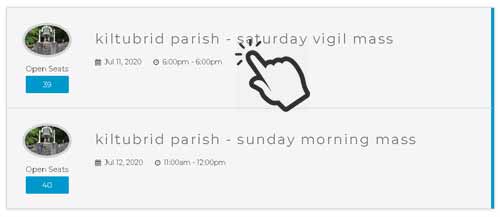
Step One.

Select the Mass that you want to attend – Just click the one you want!

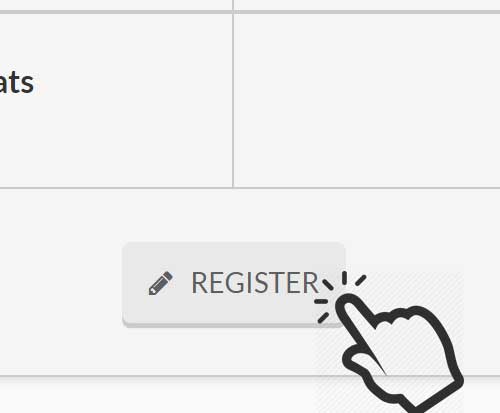
step two.

Now read and make sure you have the right Mass – if you’re happy, scroll down a little bit and click REGISTER!

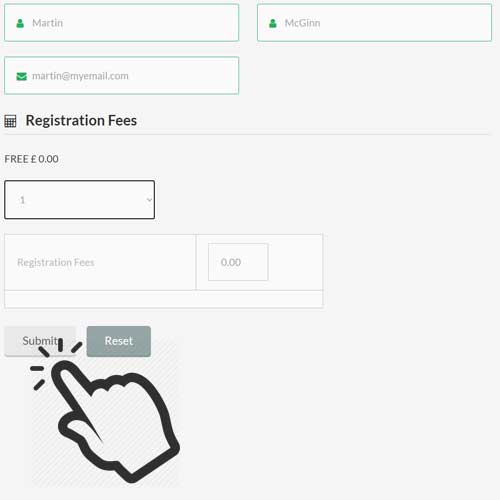
step three.

Enter your First name, Surname and most importantly the Email address – this is really, really important.   If it’s going to go wrong, it’s going to be here – enter your email address and check to make sure it’s correct. We also ask for a contact number in case we need to contact you. 

Of course there’s no charge for Mass – but this is a booking system, so under Registration Fees (which will always be ZERO) – click on the drop down list and select 1. 

Remember : One Booking = One Person.

Then press Submit!  Nearly done.

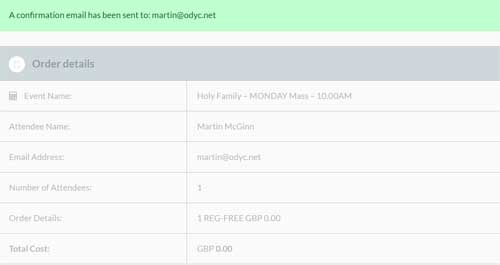
Step four.

If everything has worked, you’ll get this screen.  That’s you done.  Now check your email!

Finally

Once everything has been completed, you will get an email to confirm your booking.  That’s why it is ESSENTIAL that you use the correct email address.  If you don’t receive an email, please contact the Parish Office – we will be able to help – IF YOU GET TO THE SCREEN WHERE YOUR BOOKING HAS BEEN CONFIRMED (Step Four – the one with the nice green bar) AND YOU DID NOT RECEIVE AN EMAIL, PLEASE DO NOT BOOK AGAIN.  Please email the Parish office first.